How to Make Money with Google Adsense (Earned $42,574 So Far)

Summary
- Google Adsense pays billions of dollars every year to content creators who upload videos to Youtube and publish articles and other content on their websites.
- You get paid on the 21st of every month once your Adsense balance reaches over $100
- You need to be consistent and create high quality original content to succeed in the Adsense program.
Making money online with Google Adsense is one of the easiest ways any beginner can generate passive income with a website or Youtube channel.
What is Google Adsense?
Google Adsense is a platform for website owners, bloggers, Youtubers, and creators to earn money by placing advertisements within their content.
In Q1 2025 (first 3 months of this year), Google generated over $66 billion in ad revenue from Google Search, Youtube, and its 3rd party networks.
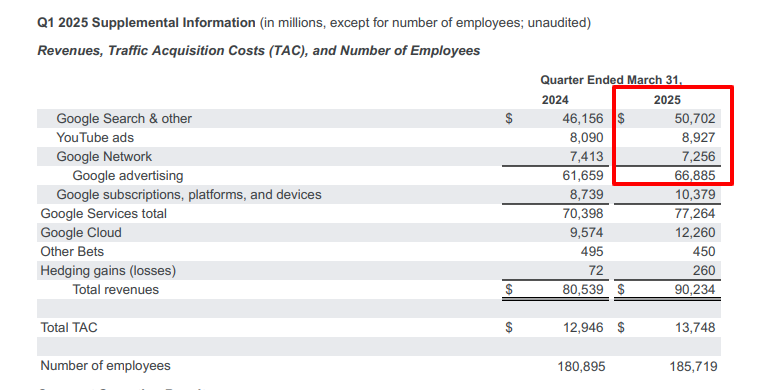
Advertisers spend money with Google then you earn a percentage of the revenue generated from showing ads within your articles, blog posts, and Youtube videos.
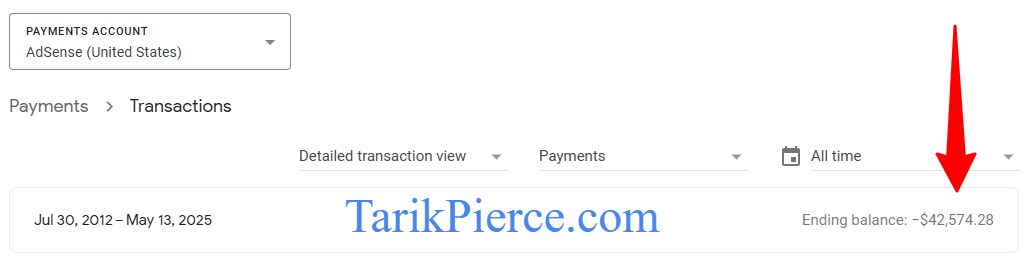
I've personally made $42,574 over the last 12 years with my own personal Adsense account.
How Does Google Adsense Work?
Advertisers spend billions of dollars every year to advertise their products and services on Google Search, Youtube, and other related Google products.
You can earn money with your website or Youtube channel by signing up for Google Adsense and showing ads alongside your content.
Google analyzes your content based on the topic & keywords then places advertisements within your content so you can make money passively.
Ads are dislaying on a pay per impression (CPM) model and you get paid based on every 1,000 pageviews or video views (for Youtube).
Once you start displaying ads, you will keep 68% of the ad revenue while Google keeps 32%.
How Much Does Adsense Pay Per 1,000 Views?
I earn around $10 per 1,000 views on my Youtube channels because the majority of my viewers are from the United States.
On my blog, I earn around $6 per 1,000 views because a bigger percentage of my pageviews come from outside the United States.
Different Google Adsense Options for Content Creators
I earn income through 2 different Adsense channels:
- Adsense for Content: I write blog posts then place ads within my website to earn money per ad impression. This article is an example of how I make money with Adsense. Google pays me every time you view an advertisement on my website.
- Adsense for Youtube: I upload videos to Youtube and get paid for every view on my Youtube channel. Google pays Youtubers a lot of money to show advertisers at the beginning and through your videos.
Getting Started with Google Adsense
I've been earning with Adsense for over a decade and will show you how to get started so you can start making money too.
Start with a Website or Youtube Channel (You can do both)
You need to create a website and/or Youtube channel to make money doing this with Adsense.
I recommend starting both a website and a Youtube channel so you can earn money with your website plus make additional income posting videos on Youtube.
You only need 1 Adsense account to make money from your website and Youtube.
Adsense Eligibility Criteria
In order to sign up for Google Adsense, you must:
- Be at least 18 years of age or older
- Create high quality, original content that's not copied from someone else
- Comply with the Google Adsense program policies
Sign Up for Google Adsense
Go to the official Google Adsense website and create an account. It's 100% free to do so and only takes a few minutes.
Google Adsense pays via direct deposit to your bank account so you need a checking account
Google will calculate how much money you earned in total then send you an ACH bank deposit around the 3rd week of every month if you earned at least $100 for the previous month.
Get Approved For Google Adsense
The Adsense approval process is a bit different for websites and Youtube channels.
Here's what you need to get approved for each:
- Adsense Approval for Websites and Blogs: Have a decent website with several high quality articles and blog posts that looks 100% legit. Read my guide on How to Get Adsense Approval for Websites for more in-depth information.
- Adsense Approval for Youtube Channels: You need at least 1,000 subscribers and 4,000 watch hours to monetize your Youtube channels. Post high quality videos to increase your subs and watch time or just buy a pre-monetized Youtube channel if you have money to invest.
Getting approved for Google Adsense is a major milestone for any WordPress blogger or site owner.
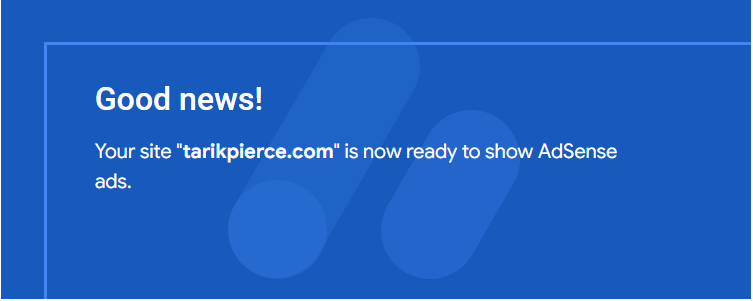
It took me 2 to 3 weeks to get approved for Google Adsense on my website. I'll show you exactly what I did even though I was rebuilding this blog from scratch.
How to Get Adsense Approval Fast
- Install a Custom WordPress Theme
- Write 20+ Human written articles (Don't use AI yet)
- Create an About Me, Contact, Privacy Policy, and Terms of Use Page
- Do not show any popups or affiliate offers
- Wait 2 to 3 weeks for approval
Install a Custom WordPress Theme (Don't Use the WordPress Default)
Always use a custom WordPress theme instead of the WordPress default theme. It makes your site look more professional and could increase the chances of you getting approved by Adsense
I'm currently using the KadenceWP theme because it's lightweight, fast, and easy to customize.
Publish 20+ Human Written Articles (Don't Use AI Yet)
A common mistake I notice is bloggers uploading a ton of AI written articles to their website when first getting started.
Don't get me wrong. I use AI from time to time but just realize Google frowns upon websites and blogs with 100% AI generated content.
Instead, I recommend writing at least 20 articles yourself or outsourcing them to a content writer via Fiverr or Upwork.
Once approved to Adsense, you can start adding more AI content on your site. I personally only use AI when explaining a basic definition or turning my Youtube videos into articles.
AI content lacks real human experience but that's exactly the type of content that drives massive traffic through organic search.
Create the Key Basic Pages
Every website needs the following pages to look credible:
- About Us
- Contact Page
- Privacy Policy
- Terms of Use
Add these pages to your WordPress site to look more professional and trustworthy.
Avoid Showing Popups or Affiliate Offers
Focus 100% on good content when applying to Adsense. You don't want to come across as a spammy site that's only trying to make money.
I avoid adding affiliate links or any paid popups in the first stages of any website to look more natural and helpful.
You can add affiliate links and popups after you get approved for Adsense.
Wait 2 to 3 Weeks for Approval
The Google Adsense team receives thousands of Adsense approval requests each week so be patient. They must approve each individual site one at a time to ensure their Adwords clients get a good ROI on their ad spent.
It took 2 to 3 weeks for me to get Adsense approved on this blog. Submit your site then start working on creating and publishing great content that keeps your visitors coming back!
Setting Up Adsense on Your Website or Youtube Channel
Once approved, you need to place ads on your website or Youtube channel so Google can start showing ads within your channel. Google doesn't do this for you automatically.
Placing Ads on Your Website
Google allows you to automatically place ads within your content with the Auto Ads feature. You can use the Auto Ads feature or place ads manually within your content at specific locations.
For WordPress Users: Install the free Google Site Kit plugin to automatically insert the Auto Ads code on your WordPress website.
Manual ads gives you more control and flexibility over how ads look on your website while Auto Ads is an easy “set it and forget it” option.
I recommend testing both methods to see which one generates the highest RPM and most ad revenue.
I normally use Auto Ads to display high paying Vignette ads while using manual ad units within my blog posts.
Placing Ads on Your Youtube Channel
Step 4: Create Content and Videos That Make You Money
Write blog posts and upload Youtube videos that focus on high earning topics to maximize your Adsense earnings. Certain topics and niches pay more than others so I tend to focus on the higher paying keywords to make the most money.
It's also important to align your content with your passion if you plan to create everything yourself. If you don't care about a topic then outsource it to a freelancer on Upwork or Fiverr so you can still make money from something you're not interested in.
Step 5: Focus on What Works then Rinse and Repeat
Once you start earning money with Adsense, analyze your data to see what's working and what doesn't.
You'll discover certain keywords and topics are your biggest money makers so it makes sense to produce more of that content.
Getting Paid: How Do I Get My Adsense Money?
Google Adsense will send you a direct deposit ACH to your bank account around the 21st of every month once your earnings reaches over $100 for the previous month.
Let's say you earned $200 with Adsense in January. You will receive a $200 direct deposit on the 21th of February directly into your checking account.
You must have a valid checking account to receive Adsense payments. Google doesn't send payments with Paypal, Cashapp, Venmo, or Bitcoin.
If you don't earn at least $100 in a month then Google will roll the entire balance over into the next month until you hit the $100 threshold.
Google Adsense is a REAL Business Not a Gimmick or Scam
There are a lot of scammers pretending to make lots of money online when they are just complete phonies. I've been making money online since 2006 and will tell you the truth about earning with Google Adsense. It's not a cakewalk and you need to learn a few skills before the money starts coming in.
Making money online with Google Adsense is just like any other job that requires hard work, effort, and consistency. 95% of people never make decent money because they treat Adsense like a hobby instead of a job.
